
Content Sharing
Storybooks and (soon) individual pages on Mythic can be shared with other people on the platform or the general public. Having Storybooks shared with you is an opt-in feature. Shared content is read-only, with collaborative features coming later. Here’s how to use it.
Storybook Sharing
Storybooks can be shared from the settings modal—accessed from the dashboard or the editor. To share privately, you need to know the email address of your recipient’s Mythic account. If the person has enabled sharing, the Storybook will immediately appear on their dashboard, with your email address listed as the owner. You can share with multiple accounts and remove accounts at any time.
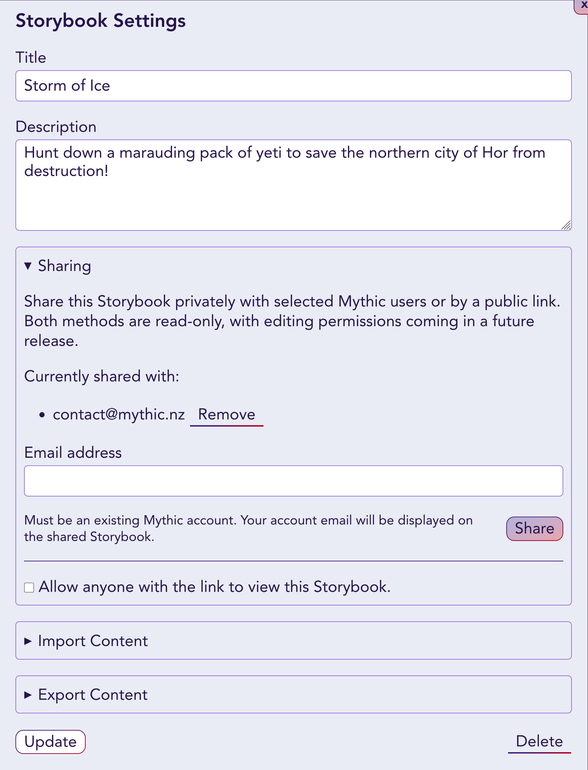
Additionally, Storybooks can be made public. These are shared by their URL and can be viewed without a Mythic account. Tick the checkbox that allows anyone with a link to view the Storybook.
In both of these cases, people with access will be able to see all the pages in the Storybook, but not edit or delete them.
Receiving Shares
By default, receiving shares is disabled. You will need to explicitly enable them either globally or for individual users. Go to your Settings page to configure this. You can either allow shares from everyone with certain accounts blocked, or block everyone with certain accounts allowed to share.
You can individually remove shared Storybooks on your dashboard, but it won’t prevent someone from re-sharing it to you. If you block someone, their Storybooks will be removed from your dashboard. Disabling sharing globally will remove all shared Storybooks.
If you feel you are being harassed by someone via the sharing feature, or they have shared content that is against our Code of Conduct, please get in touch.